Every SplitCam download is free — live multistreaming for Windows, macOS, iOS and Android, plus SplitCam Remote, a phone companion that controls your desktop stream without touching the keyboard. No watermark, no subscription.
The full SplitCam streaming studio — desktop and mobile builds share the same multistreaming engine, the same scene-and-source model, the same zero cost.
The original SplitCam. Live multistreaming studio with virtual camera, AI background and scene compositing — used by streamers, churches and broadcasters since 2003.
Native Mac build, optimised for Apple Silicon. The same multistreaming engine as Windows — virtual camera works in every Mac video app, hardware encoding via VideoToolbox.
Mobile streaming studio. Go live in vertical (Reels/Shorts) or horizontal from your phone, with beauty enhancement and live multi-platform chat.
Mobile live multistreaming for Android. Broadcast to multiple platforms at once, real-time effects, beauty filters, multi-platform chat — same product family as iOS, same engine.
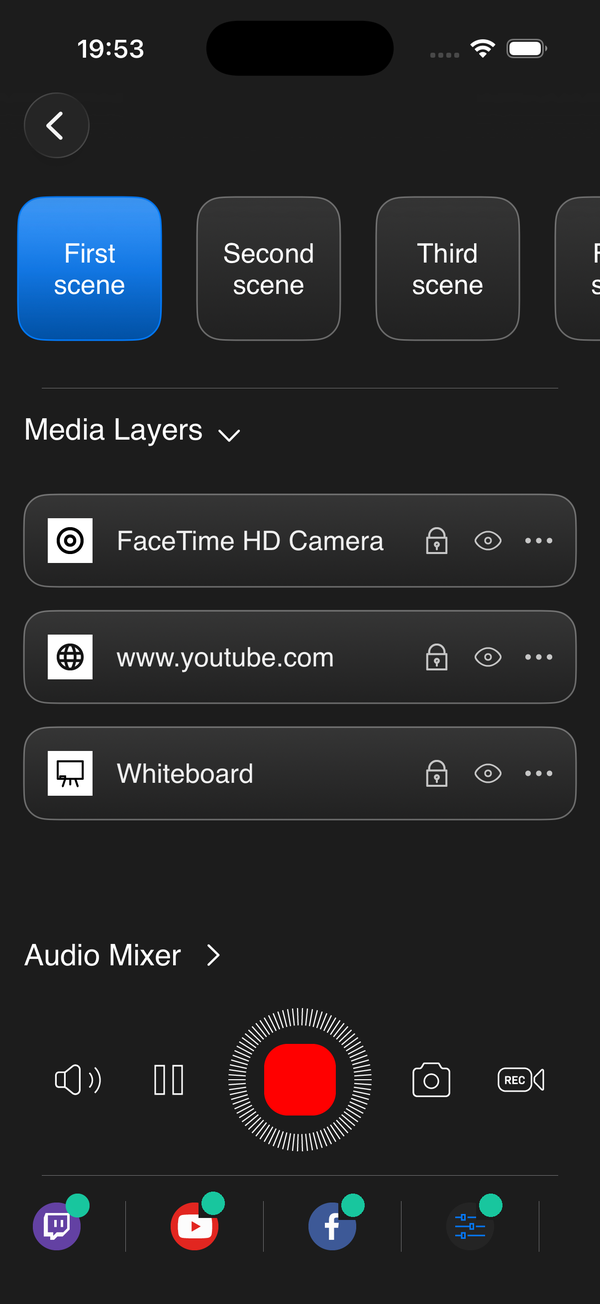
A phone app that controls the desktop SplitCam running on your Mac or Windows machine. Stay in front of the camera — switch scenes, adjust layer volumes, start recording or pause the stream without reaching for the keyboard.
Run SplitCam on the streaming PC. Open SplitCam Remote on your phone — pair automatically over the same Wi-Fi, or scan the QR code from SplitCam. Your phone becomes a director's panel.
SplitCam Remote auto-discovers your desktop on the local network — or scan the QR code on the desktop to pair instantly. No accounts to create, no cloud relay.
Open SplitCam on Windows or Mac as you normally would. Enable Remote control in Settings — that exposes a local network listener.
Free on the App Store for iPhone and iPad (iOS 17+); the Android version is coming soon. Make sure your phone is on the same Wi-Fi as the streaming PC.
The app auto-discovers your desktop on the same Wi-Fi — or scan the QR code shown in SplitCam to pair instantly. Now your phone is a director's panel — switch scenes, manage audio, go live.
Start with the desktop or mobile build — add SplitCam Remote later when you want phone control. All free, all the time.
⬇ Free Download