Free streaming software with a built-in virtual camera. Mix scenes, switch sources and broadcast live to Twitch, YouTube, Facebook, Kick + more — all from one desktop app. Free forever, no watermark.
Multi-streaming
Stream to multiple platforms from a single encode — sent peer-to-peer to Twitch, YouTube, Facebook, Kick and 84+ others at the same time. Broadcast to multiple platforms with per-destination bitrate. No cloud middleman, no monthly fee.
Sources & scenes
Webcam, IP camera, screen, game, browser, smartphone, NDI, video files, PDF slides — all as drag-and-drop layers. Build unlimited scenes and switch between them mid-broadcast with hotkeys or cinematic transitions.
Audience tools
Built-in Tip Notifier shows live donations on your stream — name, amount, message, animated image — no third-party services required. Draw on screen, blur sensitive content, replay the last 10 seconds on a hotkey.
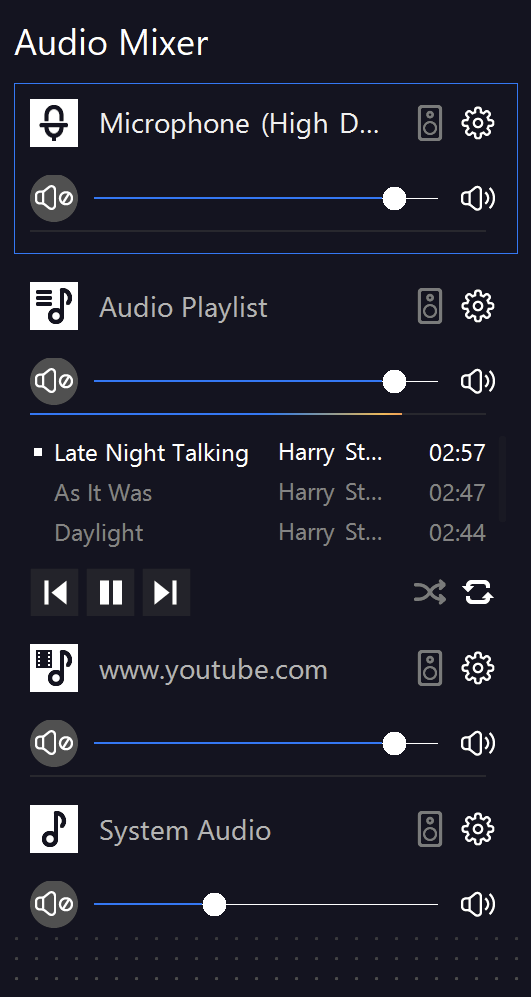
Pro Audio Mixer
Full mixer with VST 2/3 plugin support — any pro de-noise, EQ or compression plugin works inside SplitCam. Neural denoise, per-layer A/V sync correction and mic accentuation keep your voice broadcast-ready from the moment you go live.
Virtual Camera
Use SplitCam as a virtual camera for Zoom, Teams, Google Meet, Discord, Telegram, WhatsApp and 60+ other apps — a free virtual webcam with all your scenes, effects and AI background applied. Works in both landscape (16:9) and portrait (9:16) orientations.
See compatible appsEverything else included
No premium tiers, no feature locks. The free download is the full app.
Remove, blur or replace your background instantly. No green screen needed — AI detects your silhouette in real time.
Switch canvas to 9:16 for TikTok Live, Reels, Shorts and vertical Instagram Live. One studio — both orientations.
Skin smoother, skin tone, face tracking, face masking, hair color, lips color/size, eye enlargement — broadcast-grade beauty in one click.
Webcam, IP camera, screen, game, browser, NDI, video, image, PDF — plus Whiteboard, Replay, Timer and more. Every source you'll ever need.
Bring your OBS Studio scene collections in one click. Sources, scenes, transitions and hotkeys are preserved.
Wireless smartphone as a second camera over your network. Multi-cam setup without a capture card or extra hardware.
Built for everyone going live
Same software, different workflow. Each community uses SplitCam differently — pick yours.
Game Capture for DirectX/OpenGL, NVENC encoding, Replay Source, multi-stream to Twitch + YouTube + Kick simultaneously. Zero FPS impact on your game.
Studio-grade local recording, multi-track audio, OBS project import. Stream live or record for later — same scene setup, same quality.
Whiteboard source, Timer with hotkey actions, PDF & document sources, virtual camera in Zoom/Meet/Teams. Annotate over your slides live.
Multi-stream Sunday service to Facebook, YouTube and your own website at once. Lower-thirds for speakers, song lyrics overlays included.
AI background removal (no green screen), face tracking, 3D masks, chromakey. Beauty filters and Streamfog lenses ready out of the box.
VST 2/3 plugin support, multi-source audio mixer with per-track EQ, neural denoise, low-latency monitoring. Stream concerts in studio quality.
Set up in 5 minutes
No encoder configuration nightmares. SplitCam ships with presets for every major platform — just paste your stream key and click Go Live.
Available on Windows, Mac, iOS and Android. Lightweight install on desktop, App Store on mobile — no signup, no card, no watermark.
Pick from webcam, screen capture, browser, game, phone or video file. Drag, resize, layer in your scene.
Twitch, YouTube and Facebook are pre-configured. Paste your stream key, or add a custom RTMP endpoint.
One button starts every selected stream at once — and you're live on every platform.
How creators use it
From gaming streams to Sunday service to vertical TikTok lives — real setups SplitCam already replaces, in users' own words.
"Replaced OBS + Restream combo with just SplitCam. CPU load dropped and I got 30 minutes back per stream — no setup juggling between apps."
"Recording 1080p60 with multi-track audio and dragging my OBS scene collection straight in — saved a full evening of rebuilding scenes."
"Streaming Sunday service for 4 years. Free, no watermark, broadcasts to Facebook and YouTube at the same time. Setup took 10 minutes."
"Whiteboard source plus SplitCam as the virtual camera in Zoom — I can annotate slides live during the lesson without juggling tabs or apps."
"AI background removal in seconds — no green screen, no chromakey tuning. Face tracking and beauty filters are good enough for a live show."
"Online music lessons across Zoom and YouTube — the virtual camera plus VST plugin support is exactly what I needed. No subscription, no time limit."
Recent releases
Focused on what streamers actually asked for — highlights from recent SplitCam releases, up to v10.9.2.
Choose the restream ingest server from the available list — pick the closest region for lower latency and fewer dropped frames on multi-platform streams.
Switch to a 9:16 canvas for TikTok Live, Reels, Shorts and vertical Instagram Live. Horizontal and vertical setups stay fully independent, audio included.
Capture the last 5–10 seconds of any scene with a hotkey. Instant slow-mo replays during gameplay or perfect highlights mid-stream.
Rotate any layer horizontally or vertically with real perspective. Tilt a cam, a lower third or an overlay to add depth to your scene.
Three new scene transitions: Luma Wipe for cinematic mask cuts (with preinstalled semitransparent files), Slide and Swipe for clean horizontal handoffs between segments.
Send any scene — or a single layer from any scene — to your virtual camera in Zoom, Teams or Meet. Pick the exact output in SplitCam Settings.
Frequently asked
Everything you need to know before downloading.
Yes — completely free for personal and commercial use. No watermark, no time limit, no upsell to a "pro" version. Every feature is unlocked from day one.
SplitCam is available for Windows 10/11, macOS 11+, iOS 16+ (iPhone & iPad), and Android 8+. The Download button auto-detects your OS.
Yes — SplitCam imports OBS scene collections in one click. All your sources, scenes, transitions and hotkeys carry over without rebuilding. See how the two stack up: SplitCam vs OBS.
Up to 8 simultaneously; no hard cap — your upload speed is the practical limit. Streams go peer-to-peer from your PC to each platform, no cloud server in the loop. Full multistreaming guide →
No — SplitCam uses hardware encoders (NVENC for Nvidia, QuickSync for Intel, AMF for AMD) by default. Encoding runs on dedicated GPU silicon, leaving your CPU and main GPU cores free for the game. Most users see 0–3% FPS impact.
Yes — SplitCam exposes your entire stream (with scenes, effects, overlays, AI background removal) as a virtual webcam in Zoom, Microsoft Teams, Google Meet, Discord, and 60+ other apps. Works in both portrait (9:16) and landscape (16:9) modes.
Minimum: Intel Core i3 / AMD Ryzen 3, 4GB RAM, integrated graphics. Recommended for game streaming: Intel Core i5+ / AMD Ryzen 5+, 8GB RAM, dedicated GPU with NVENC/AMF support. Runs smoothly on older laptops too.
Your scenes, recordings and stream settings stay on your machine. SplitCam doesn't upload anything to the cloud unless you explicitly enable Cloud Projects to sync settings between devices.
One app for multistreaming, virtual camera, scenes and recording — on Windows, macOS, iOS and Android. Free and ad-free since 2003.