Products

Download SplitCam — आपकी हर screen पर.

हर SplitCam download free है — Windows, macOS, iOS और Android के लिए live multistreaming, साथ में SplitCam Remote: एक phone companion जो keyboard को छुए बिना आपके desktop stream को control करता है. कोई watermark नहीं, कोई subscription नहीं.

हमेशा के लिए free कोई watermark नहीं Peer-to-peer multistream 2003 से बना रहे हैं
Live streaming

किसी भी device से stream कीजिए

पूरा SplitCam streaming studio — desktop और mobile builds वही multistreaming engine, वही scene-and-source model और वही zero cost share करते हैं.

SplitCam for Windows v10.9.2

Windows 10 · Windows 11

असली SplitCam. Virtual camera, AI background और scene compositing वाला live multistreaming studio — 2003 से streamers, churches और broadcasters इसे इस्तेमाल कर रहे हैं.

  • 84+ platforms पर peer-to-peer multistream
  • Zoom, Teams, Meet, Discord के लिए virtual camera
  • AI background — green screen की ज़रूरत नहीं
  • एक click में OBS Project Import
  • Hardware encoding: NVENC · QuickSync · AMF

SplitCam for macOS v1.19

macOS 13+ · Apple Silicon

Native Mac build, Apple Silicon के लिए optimised. Windows जैसा ही multistreaming engine — virtual camera हर Mac video app में काम करता है, hardware encoding VideoToolbox के ज़रिए.

  • 84+ platforms पर एक साथ multistream
  • FaceTime, Zoom, Teams, Meet के लिए virtual camera
  • GPU-accelerated effects वाले multi-source scenes
  • 4K तक screen और window capture
  • Noise suppression वाला audio mixer

SplitCam for iOS Beta

iOS 16+ · iPhone · iPad

Mobile streaming studio. अपने phone से vertical (Reels/Shorts) या horizontal live जाइए — beauty enhancement और live multi-platform chat के साथ.

  • कई platforms + RTMP पर multistream
  • Vertical 9:16 और horizontal 16:9 canvases
  • 4K तक, in-app multi-platform chat
  • Real-time AR filters और visual effectsडेवलपमेंट में
  • Picture-in-picture — browse करते हुए stream कीजिएडेवलपमेंट में

SplitCam for Android Beta

Android · phone & tablet

Android के लिए mobile live multistreaming. एक साथ कई platforms पर broadcast, real-time effects, beauty filters, multi-platform chat — iOS जैसा ही product family, वही engine.

  • कई platforms + RTMP पर multistream
  • Effects और beauty filters
  • Vertical और horizontal streaming
  • Platforms के बीच in-app live chat
  • लंबे stable sessions के लिए adjustable bitrate
Companion app

SplitCam Remote — आपकी stream, आपके हाथ में

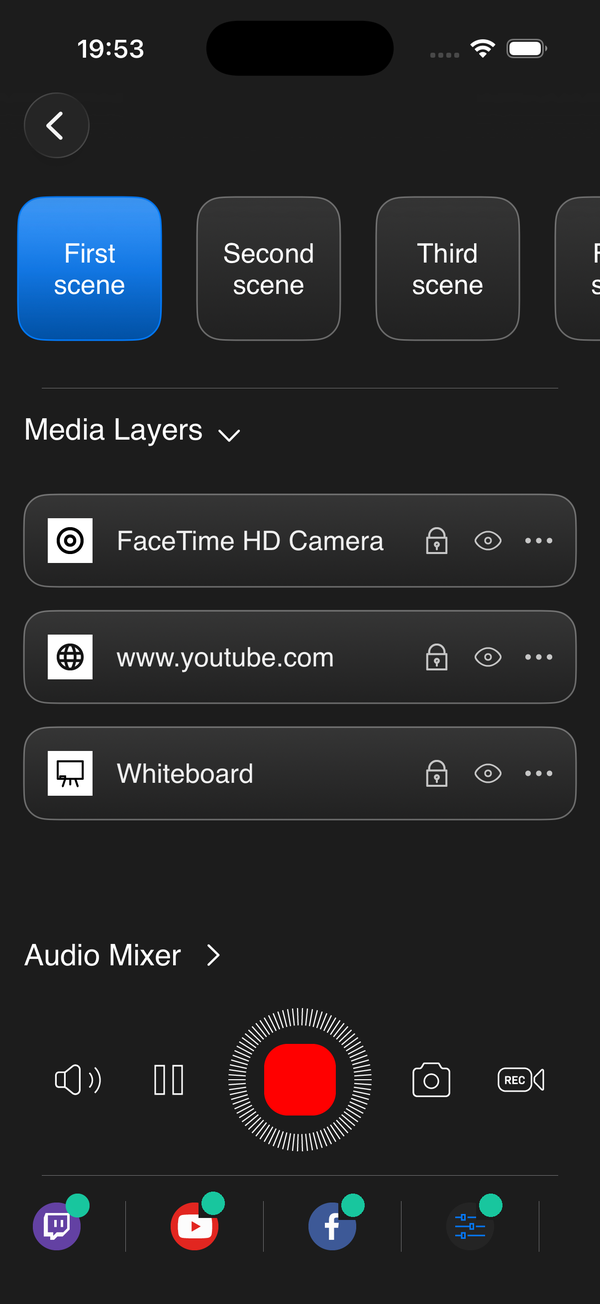
एक phone app जो आपके Mac या Windows machine पर चल रहे desktop SplitCam को control करता है. Camera के सामने बने रहिए — keyboard की तरफ़ हाथ बढ़ाए बिना scenes switch कीजिए, layer volumes adjust कीजिए, recording शुरू कीजिए या stream pause कीजिए.

एक tap. keyboard की तरफ़ बार-बार झुकना बंद.

streaming PC पर SplitCam चलाइए. अपने phone पर SplitCam Remote खोलिए — एक ही Wi-Fi पर अपने आप pair कीजिए, या SplitCam से QR code scan कीजिए. आपका phone एक director's panel बन जाता है.

  • Scenes switch कीजिए — wide / pulpit / gameplay / lyrics, एक tap में
  • Per-layer volume — mic, music, game audio, guest call, हर एक अलग से
  • Layers mute / hide कीजिए — stream के बीच कोई camera या source बंद कीजिए
  • Streaming start / stop कीजिए — कमरे के दूसरे कोने से live जाइए, live ख़त्म कीजिए
  • Stream pause कीजिए — थोड़ी देर का break लीजिए, बिना झटके के resume कीजिए
  • Recording start / stop कीजिए — चलते-चलते clips capture कीजिए
Download on theApp Store Google Playजल्द आ रहा है
इनके साथ काम करता है: Windows 10/11 और macOS 13+ पर SplitCam desktop. Phone और desktop एक ही local network पर होने चाहिए — कोई cloud बीच में नहीं, कोई monthly fee नहीं. Tap और action के बीच sub-100ms latency.
How it works

तीन steps में pair कीजिए

SplitCam Remote आपके desktop को local network पर अपने आप ढूँढ लेता है — या तुरंत pair करने के लिए desktop पर दिख रहा QR code scan कीजिए. कोई account बनाने की ज़रूरत नहीं, कोई cloud relay नहीं.

Step 01

अपने computer पर SplitCam चलाइए

Windows या Mac पर SplitCam हमेशा की तरह खोलिए. Settings में Remote control enable कीजिए — इससे एक local network listener खुल जाता है.

Step 02

अपने phone पर SplitCam Remote install कीजिए

iPhone और iPad (iOS 17+) के लिए App Store पर free; Android version जल्द आ रहा है. ध्यान रखिए कि आपका phone streaming PC जैसी ही Wi-Fi पर हो.

Step 03

Pair करने के लिए tap कीजिए, फिर control कीजिए

App आपके desktop को एक ही Wi-Fi पर अपने आप ढूँढ लेता है — या तुरंत pair करने के लिए SplitCam में दिख रहा QR code scan कीजिए. अब आपका phone एक director's panel है — scenes switch कीजिए, audio manage कीजिए, live जाइए.

जो SplitCam चाहिए वो चुनिए

Desktop या mobile build से शुरू कीजिए — जब phone control चाहिए तब बाद में SplitCam Remote जोड़ लीजिए. सब free, हर वक़्त.

⬇ Free Download