Libreng streaming software na may built-in virtual camera. Mag-mix ng scenes, mag-switch ng sources, at mag-broadcast nang live sa Twitch, YouTube, Facebook, Kick + marami pa — lahat sa iisang desktop app. Libre forever, walang watermark.
Multistreaming
Mag-stream sa maraming platform mula sa iisang encode — ipinapadala nang peer-to-peer sa Twitch, YouTube, Facebook, Kick at 84+ iba pa, lahat sabay. Mag-broadcast sa maraming platform na may sariling bitrate kada destination. Walang cloud middleman, walang monthly fee.
Sources & scenes
Webcam, IP camera, screen, game, browser, smartphone, NDI, video files, PDF slides — lahat as drag-and-drop layers. Gumawa ng walang-limitasyong scenes at mag-switch sa pagitan nila habang nag-bo-broadcast — gamit ang hotkeys o cinematic transitions.
Audience tools
May built-in Tip Notifier na nagpapakita ng live donations sa stream mo — pangalan, amount, message, animated image — walang kailangang third-party services. Mag-drawing sa screen, mag-blur ng sensitive content, i-replay ang huling 10 segundo sa isang hotkey.
Pro Audio Mixer
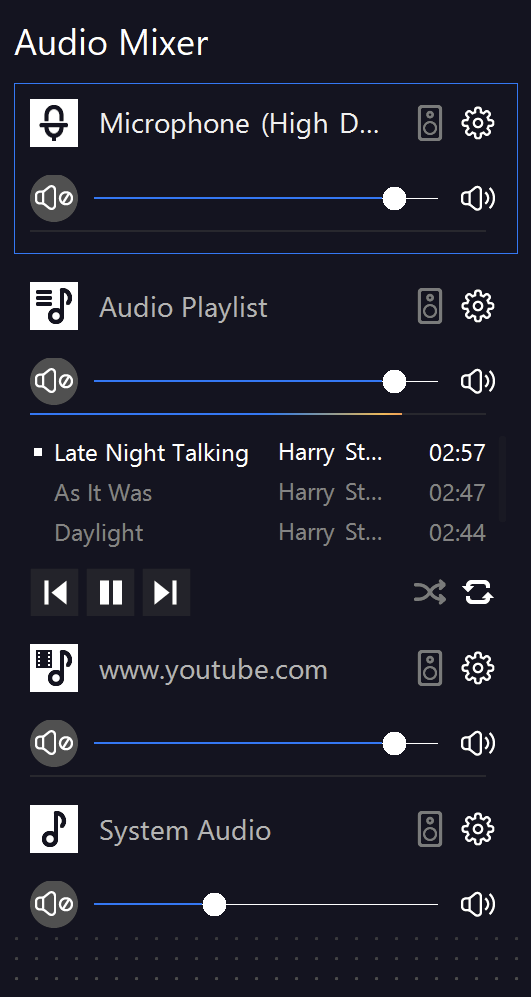
Buong mixer na may VST 2/3 plugin support — kahit anong pro de-noise, EQ o compression plugin ay gumagana sa loob ng SplitCam. Neural denoise, per-layer A/V sync correction at mic accentuation — laging broadcast-ready ang boses mo mula sa sandaling mag-live ka.
Virtual Camera
Gamitin ang SplitCam bilang virtual camera para sa Zoom, Teams, Google Meet, Discord, Telegram, WhatsApp at 60+ iba pang apps — isang libreng virtual webcam na may lahat ng scenes, effects at AI background mo. Gumagana sa landscape (16:9) at portrait (9:16) orientations.
Tingnan ang compatible appsLahat ng iba pa, kasama na rin
Walang premium tiers, walang naka-lock na features. Ang libreng download ay ang buong app.
Tanggalin, i-blur o palitan ang background mo agad. Walang kailangang green screen — kinikilala ng AI ang silhouette mo in real time.
I-switch ang canvas sa 9:16 para sa TikTok Live, Reels, Shorts at vertical Instagram Live. Isang studio — dalawang orientation.
Skin smoother, skin tone, face tracking, face masking, hair color, lips color/size, eye enlargement — broadcast-grade beauty in one click.
Webcam, IP camera, screen, game, browser, NDI, video, image, PDF — plus Whiteboard, Replay, Timer at marami pa. Lahat ng source na kakailanganin mo.
Dalhin ang OBS Studio scene collections mo in one click. Naka-preserve ang sources, scenes, transitions at hotkeys.
Wireless smartphone bilang second camera over your network. Multi-cam setup nang walang capture card o dagdag na hardware.
Para sa lahat ng nag-live
Parehong software, ibang workflow. Bawat community ay iba ang paggamit sa SplitCam — piliin ang sa'yo.
Game Capture para sa DirectX/OpenGL, NVENC encoding, Replay Source, multistream sa Twitch + YouTube + Kick nang sabay. Zero FPS impact sa laro mo.
Studio-grade na local recording, multi-track audio, OBS project import. Mag-stream live o mag-record para sa later — parehong scene setup, parehong quality.
Whiteboard source, Timer na may hotkey actions, PDF & document sources, virtual camera sa Zoom/Meet/Teams. Mag-annotate sa slides mo nang live.
Multistream ang Sunday service sa Facebook, YouTube at sariling website nang sabay. May kasamang lower-thirds para sa speakers at song lyrics overlays.
AI background removal (walang green screen), face tracking, 3D masks, chromakey. Handa na ang beauty filters at Streamfog lenses out of the box.
VST 2/3 plugin support, multi-source audio mixer na may per-track EQ, neural denoise, low-latency monitoring. Mag-stream ng concerts sa studio quality.
Mag-set up sa 5 minuto
Walang encoder configuration na sakit ng ulo. May kasamang presets ang SplitCam para sa bawat malaking platform — i-paste lang ang stream key mo at i-click ang Go Live.
Available sa Windows, Mac, iOS at Android. Magaan ang install sa desktop, App Store sa mobile — no signup, no card, no watermark.
Pumili mula sa webcam, screen capture, browser, game, phone o video file. I-drag, i-resize, i-layer sa scene mo.
Pre-configured na ang Twitch, YouTube at Facebook. I-paste ang stream key mo, o magdagdag ng custom RTMP endpoint.
Isang button ang nagsisimula ng bawat napiling stream nang sabay — at live ka na sa lahat ng platform.
Paano ito ginagamit ng mga creator
Mula gaming streams hanggang Sunday service hanggang vertical TikTok lives — totoong setups na pinapalitan na ng SplitCam, sa sariling salita ng mga users.
"Pinalitan ang OBS + Restream combo ng SplitCam lang. Bumaba ang CPU load at nakabawi ako ng 30 minuto kada stream — walang juggling sa pagitan ng apps."
"Nag-record ng 1080p60 na may multi-track audio at idinrag ang OBS scene collection ko diretso — nakatipid ng buong gabi sa pag-rebuild ng scenes."
"4 na taon nang nag-i-stream ng Sunday service. Libre, walang watermark, nagbo-broadcast sa Facebook at YouTube nang sabay. 10 minuto lang ang setup."
"Whiteboard source plus SplitCam bilang virtual camera sa Zoom — kaya kong mag-annotate ng slides nang live habang klase, walang juggling ng tabs o apps."
"AI background removal in seconds — walang green screen, walang chromakey tuning. Sapat na ang face tracking at beauty filters para sa live show."
"Online music lessons sa Zoom at YouTube — ang virtual camera plus VST plugin support ang eksaktong kailangan ko. Walang subscription, walang time limit."
Recent releases
Naka-focus sa talagang hinihingi ng mga streamer — highlights mula sa recent SplitCam releases, hanggang v10.9.2.
Piliin ang restream ingest server mula sa available na listahan — pumili ng pinakamalapit na region para sa mas mababang latency at mas kaunting dropped frames sa multi-platform streams.
I-switch sa 9:16 na canvas para sa TikTok Live, Reels, Shorts at vertical Instagram Live. Buong magkahiwalay ang horizontal at vertical setups, kasama na ang audio.
I-capture ang huling 5–10 segundo ng kahit anong scene sa isang hotkey. Instant na slow-mo replays habang gameplay o perpektong highlights mid-stream.
I-rotate ang kahit anong layer nang horizontal o vertical na may totoong perspective. I-tilt ang cam, lower third o overlay para magdagdag ng depth sa scene mo.
Tatlong bagong scene transitions: Luma Wipe para sa cinematic na mask cuts (may preinstalled na semitransparent files), Slide at Swipe para sa malinis na horizontal handoffs sa pagitan ng segments.
Ipadala ang kahit anong scene — o isang layer mula sa kahit anong scene — sa virtual camera mo sa Zoom, Teams o Meet. Piliin ang eksaktong output sa SplitCam Settings.
Madalas itanong
Lahat ng kailangan mong malaman bago mag-download.
Oo — libre talaga, para sa personal at commercial use. No watermark, no time limit, no upsell to a "pro" version. Naka-unlock na ang bawat feature mula day one.
Available ang SplitCam sa Windows 10/11, macOS 11+, iOS 16+ (iPhone & iPad), at Android 8+. Ang Download button ay auto-detect ng OS mo.
Oo — nag-i-import ang SplitCam ng OBS scene collections in one click. Lahat ng sources, scenes, transitions at hotkeys mo ay napupunta nang walang rebuild.
Up to 8 nang sabay; walang hard cap — ang upload speed mo ang praktikal na limitasyon. Nagpapadala ang streams peer-to-peer mula sa PC mo papunta sa bawat platform, walang cloud server sa loop. Kumpletong multistreaming guide →
Hindi — by default, gumagamit ang SplitCam ng hardware encoders (NVENC for Nvidia, QuickSync for Intel, AMF for AMD). Tumatakbo ang encoding sa dedicated GPU silicon, kaya malaya ang CPU at main GPU cores mo para sa laro. Karamihan ng users ay 0–3% lang ang FPS impact.
Oo — inilalantad ng SplitCam ang buong stream mo (kasama ang scenes, effects, overlays, AI background removal) bilang virtual webcam sa Zoom, Microsoft Teams, Google Meet, Discord, at 60+ iba pang apps. Gumagana sa portrait (9:16) at landscape (16:9) modes.
Minimum: Intel Core i3 / AMD Ryzen 3, 4GB RAM, integrated graphics. Recommended para sa game streaming: Intel Core i5+ / AMD Ryzen 5+, 8GB RAM, dedicated GPU na may NVENC/AMF support. Smooth pa rin kahit sa mas lumang laptop.
Nananatili sa PC mo ang scenes, recordings at stream settings. Walang ina-upload ang SplitCam sa cloud unless you explicitly enable Cloud Projects para mag-sync ng settings sa pagitan ng devices.
Isang app para sa multistream, virtual camera, scenes at recording — sa Windows, macOS, iOS at Android. Libre at walang ads since 2003.