DroidCam · iVCam · Camo alternative

A free alternative to DroidCam, iVCam and Camo, for Windows and Mac.

DroidCam, iVCam and Camo turn a phone into a webcam. DroidCam's free version is 640×480, with a watermark on HD until you buy Pro; iVCam's is a trial with a watermark; Camo's pricing page lists 720p and below at 30 fps for its free tier. SplitCam is free for Windows and macOS and has no paid plan.

⬇ Free Download See the table ↓
Free, no paid planUp to 4K with the phone appWi-Fi, or a QR code on WindowsWindows and macOS
The short version: should you switch from DroidCam, iVCam or Camo?
  1. DroidCam: free use at 640×480 has no time limit, and DroidCam says removing the watermark from HD video takes the Pro upgrade. SplitCam adds no watermark.
  2. iVCam: the free version is a trial with a watermark and occasional ads; after the trial expires, video drops to 640×480. SplitCam has no trial to run out.
  3. Camo: its pricing page lists 720p and below at 30 fps for the free version, with no watermark and no ads, and its overview page says Pro unlocks 1080p and above. Pro is $9.99 a month, $49.99 a year or $99.99 for life (USD), and Camo's own pages differ on some details of the free version. SplitCam has no Pro tier; with its phone app it takes up to 4K from phones that support it.
  4. One caveat: this page compares setups, not every feature. The details about the three apps come from the vendors' own sites and store pages, checked on November 2, 2026.

How the phone fits into a SplitCam scene

In SplitCam the phone joins a scene alongside shared screens, slides or other cameras. On Windows, a QR code (Remote Camera → Phone Cam Browser) can also bring the phone in without an app, while on Windows the phone-app route needs SplitCam 11.0.15 or later. The steps are in the setup guide.

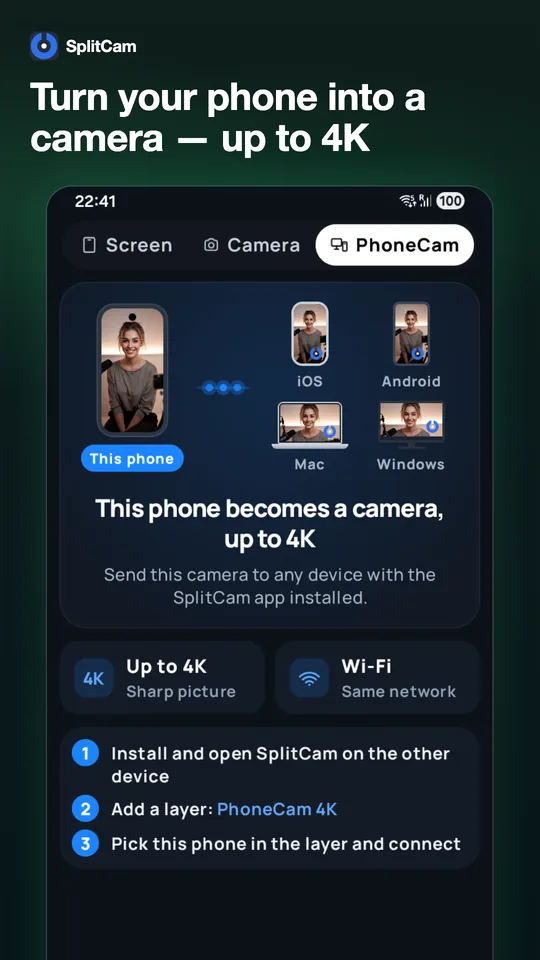
The PhoneCam 4K screen of the SplitCam app on a phone. The headline reads “Turn your phone into a camera — up to 4K,” and three numbered steps follow.
PhoneCam 4K in the SplitCam phone app: this phone is the camera, and a computer running SplitCam on the same Wi-Fi network can receive it.
Phone camera
Screen or slide
Second camera
SplitCam sceneLayers, effects, audio
Video calls and OBS
Live streams and recordings
What leaves the scene: a camera for your video apps (SplitCam's virtual camera), a live stream, or a local recording.

SplitCam and the three apps at a glance

Free-version limits and prices, from the vendors' own sites and store pages, checked on November 2, 2026 (prices in USD; app-store prices from the US stores).

SplitCam

DroidCam

Android and iOS app; clients for Windows and Linux; OBS plugin

Free
640×480 with no time limit. HD can be tried, with a watermark until you buy Pro. The Android app carries a “Contains ads” label.
Paid
On the US App Store, Pro Upgrade is listed twice, at $12.99 and $4.99. Google Play lists in-app purchases from $4.99 to $14.99 per item. Pro upgrades are separate purchases in each store.

iVCam

Android and iOS app; PC client listed for Windows (e2eSoft)

Free
A trial, with an “iVCam” watermark in the top-left corner and occasional ads. After the trial expires, video drops to 640×480 and audio to low quality; rewarded ads in the app let you keep testing.
Paid
PC license $12.95 for 1 year or $25.95 permanent; in the app, $7.99 to $24.99. iVCam says licenses cannot be transferred between the stores and the PC.

Camo

Camo Camera app; Camo Studio for Mac and Windows

Free
720p and below at 30 fps, per its pricing page, which also says no watermark and no ads. Its own pages differ on some details of what the free version includes.
Paid
Pro is $9.99 a month, $49.99 a year or $99.99 for life. A license covers up to two computers.

SplitCam vs DroidCam, iVCam and Camo

These details come from the vendors' own sites, Google Play and the App Store, checked on November 2, 2026. Plans and prices change at the vendors' end; look them up in the app or store before buying.

FeatureSplitCamDroidCamiVCamCamo
PriceFree; there is no paid planApp Store: Pro Upgrade $12.99 and $4.99; Google Play: in-app purchases $4.99 to $14.99 (US stores)PC license $12.95 a year or $25.95 permanent; in the app, $7.99 to $24.99Pro $9.99 a month, $49.99 a year or $99.99 for life
Without payingNothing to pay: up to 4K with the phone app on phones that support it, no watermark640×480, no time limit; HD carries a watermark until you buy ProA trial with an “iVCam” watermark; after the trial, 640×480 and low-quality audio720p and below, 30 fps; no watermark, no ads (Camo's pricing page)
ComputersWindows 10 and 11, macOS 13 or laterClients for Windows (10 and 11) and Linux (beta); OBS plugin for Windows, macOS and LinuxPC client listed for Windows 7 SP1, 8, 10 and 11 (e2eSoft)Camo Studio for macOS 12.3 or later and Windows 10 or later (per camo.com)
On the phoneThe SplitCam phone app (an iPhone on a Mac); on Windows also a QR code, which needs no appThe DroidCam app (Android, iOS)The iVCam app (Android, iOS)The Camo Camera app (Android, iOS)
How video apps see the phoneAs the SplitCam virtual cameraA “DroidCam Video” webcam with the Windows client; OBS Virtual Camera with the pluginA webcam named “e2eSoft iVCam”; apps get the same video the iVCam window showsA virtual camera named “Camo Camera” in more than 40 video apps, including OBS
More than one phonePhones, webcams and capture cards can share a scene setIn the OBS plugin, you add another DroidCam sourceSeveral phones at once, after you install extra iVCam instances (drivers) on the PCStore listings mention switching between several devices in real time; Camo's support manual describes a scene with two or more video sources
Audio from the phoneIncluded with either connection method, when available; volume and mute in SplitCamSupported; the vendor says audio quality and latency may vary and recommends video-only useThe phone as a wireless microphone; the microphone driver is an optional part of the PC installerThe phone's microphone as an audio source, plus a virtual microphone

Sources, checked November 2, 2026. DroidCam: droidcam.app, help, Windows, Linux, OBS plugin, OBS usage, 4K guide, App Store, Google Play. iVCam: e2esoft.com/ivcam, purchase page, PC product page, camera settings, sound, multiple instances, broadcasting, App Store, Google Play. Camo: camo.com/pricing, overview, video settings, checkout, App Store, Google Play. EpocCam: elgato.com/epoccam, checked November 9, 2026. We did not test image quality, latency or battery use.

Questions about switching from DroidCam, iVCam or Camo

How do I remove the iVCam watermark?

As of November 2, 2026, iVCam says the watermark and the ads go away when you buy a license, either in the app or for the PC client. If you would rather not pay, SplitCam adds no watermark.

How do I remove the DroidCam watermark?

As of November 2, 2026, DroidCam's App Store page says HD video can be tried in the app and that removing the watermark takes the Pro upgrade; its help page says the Pro upgrade removes watermarks from HD video. Free use at 640×480 has no time limit.

Is Camo Studio free, and what does Camo Pro cost?

Camo has a free tier and a Pro tier. Its pricing page lists 720p (HD) and below at 30 fps for the free version. Pro is $9.99 a month, $49.99 a year or $99.99 for life (USD, checked November 2, 2026), and unlocks 1080p and above, including 4K, with a 60 fps option. Camo's own pages differ on some details of what the free version includes, so check the app.

What happens when the iVCam trial ends?

As of November 2, 2026, iVCam says that after the trial expires, without a purchase, video is limited to 640×480 and audio to low quality, and Camera Settings and Background Removal are restricted; the app also offers rewarded ads to keep testing. iVCam's PC product page says the trial and registered versions do not differ, while its purchase, camera-settings and sound pages describe the limits above. The trial length is not stated on the pages we checked.

Is SplitCam a free alternative to DroidCam, iVCam and Camo?

It can be, if you want a free phone camera on Windows, or an iPhone camera on a Mac, with no paid plan.

Is there an alternative to EpocCam?

As of November 9, 2026, Elgato's EpocCam page says “EpocCam is no longer available” and points to its Facecam webcams. If you are looking for a way to use a phone as a webcam, SplitCam can bring a phone into a scene: with the SplitCam phone app (an iPhone on a Mac) or, on Windows, also with a QR code. In your video apps you then choose SplitCam as the camera.

Is there an alternative to the DroidCam OBS plugin?

Yes, in a different form. DroidCam's OBS plugin adds the phone as a source in OBS, and its 4K guide says 4K is available through it (checked November 2, 2026). In SplitCam you pick SplitCam as the camera in OBS, and OBS receives the finished scene, phone included.

Can an iPhone be the camera on a Mac with SplitCam?

Yes. It needs macOS 13 or later and SplitCam's iPhone app on the same Wi-Fi network as the Mac. The setup guide walks through it.

The camera you already carry, free and without a watermark.

Download SplitCam for Windows or macOS, then bring your phone in with the SplitCam phone app (an iPhone on a Mac) or, on Windows, a QR code.

⬇ Free Download